
Every business runs on processes. Some are simple, like approving a purchase order. Others are complex, like onboarding a new client across multiple departments.
The problem? Most of these processes still involve too much manual work. Someone has to copy data from one system to another. Someone else has to send reminder emails. A third person needs to update a spreadsheet.
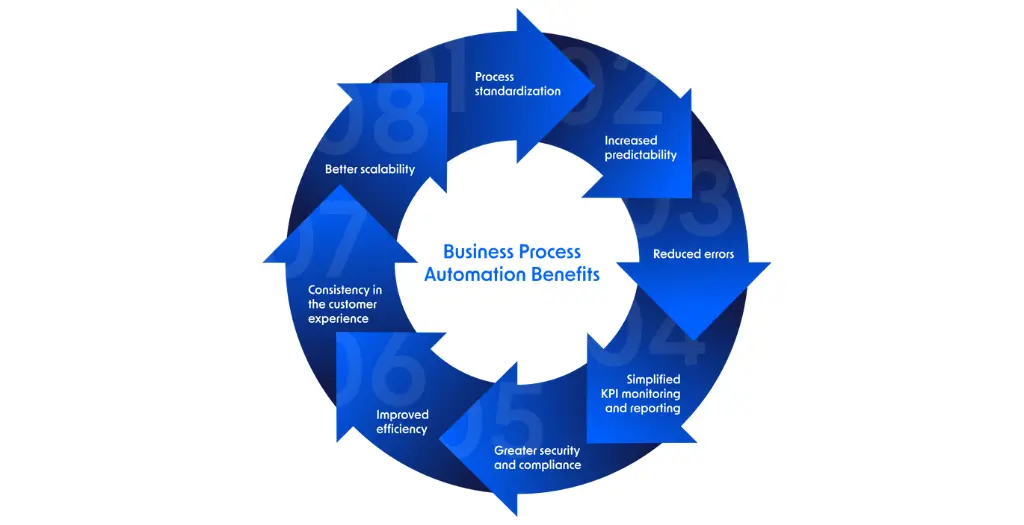
Business process automation changes that. It takes repetitive, rule-based tasks and hands them off to software. The result is faster work, fewer errors, and teams that can focus on what actually requires human judgment.
This isn’t a new concept. But the tools available today make automation more accessible than ever. You don’t need a massive IT budget or a team of developers to get started.
How Business Process Automation Actually Works
At its core, business process automation uses software to execute tasks that follow predictable rules.
Here’s a simple example. When a customer fills out a contact form on your website, several things need to happen. The lead goes into your CRM. Someone from sales gets notified. A confirmation email goes to the customer. Maybe the lead also gets added to a marketing email sequence.
Without automation, someone manually handles each step. With automation, the software does it all the moment the form is submitted.
The key is that these tasks follow clear logic. If this happens, then do that. No complex decision-making required.
Modern automation platforms use triggers and actions. A trigger is the event that starts the process (like that form submission). Actions are what happens next (add to CRM, send email, create tasks).
You can chain multiple actions together. You can add conditions (if the lead is from Europe, assign to this salesperson; if from North America, assign to that one). You can build workflows that touch several different tools your business already uses.
Common Business Processes Worth Automating
Some processes deliver more value when automated than others. Here are the ones most businesses start with:
Data entry and transfer might be the most obvious candidate. Anytime you’re copying information from one place to another, automation can probably handle it. Customer details from forms to your database. Order information from your store to your fulfillment system. Invoice data from emails to your accounting software.
Employee onboarding involves a long checklist. Create accounts, assign equipment, send documents, schedule training, and add to team channels. Automation can trigger most of these steps the moment HR marks someone as hired.
Approval workflows slow down when requests sit in someone’s inbox. Automated routing sends requests to the right person, escalates if there’s no response, and updates everyone when decisions are made.
Customer support often involves repetitive responses. Automation can handle common questions, route tickets based on keywords, update customers when status changes, and flag urgent issues for immediate attention.
Invoice and payment processing includes matching purchase orders, verifying receipts, flagging discrepancies, and updating accounting records. Software can handle the routine cases and only involve humans when something doesn’t match.
Here’s a comparison of manual versus automated approaches:
| Process | Manual Approach | Automated Approach |
| New lead follow-up | Sales rep checks inbox, manually adds to CRM, sets reminder | Lead auto-added to CRM, assigned by territory, follow-up email scheduled |
| Expense approval | Employee emails receipt, manager approves via reply, finance manually enters data | Employee submits via app, routes to manager, auto-updates accounting when approved |
| Customer onboarding | Send welcome email, manually create accounts, schedule calls via back-and-forth emails | Welcome email triggers on purchase, accounts created automatically, calendar link provided |
| Report generation | Gather data from multiple sources, build spreadsheet, format, distribute | Scheduled reports pull latest data, format consistently, email to stakeholders |
Why This Matters More Now Than Before
The business environment puts more pressure on efficiency than it used to. Customer expectations have changed. People expect instant responses. They want updates without having to ask. They notice when your processes feel clunky.
Competition has intensified across most industries. Companies that can move faster and operate leaner have an edge. When your team spends less time on administrative work, they can spend more time solving real problems.
The cost of manual processes has also increased. Labor costs rise while software costs often decrease. The math shifts in favor of automation for tasks that used to make sense to handle manually.
Remote and hybrid work creates new challenges too. Processes that relied on walking over to someone’s desk or passing around a physical document don’t work anymore. Automated workflows keep things moving regardless of where people are located.
Technology has become easier to use. You don’t need technical skills to set up basic automation anymore. Most platforms use visual interfaces where you drag and drop elements to build workflows. The barrier to entry is much lower.

Real-World Example: Marketing Agency Workflow
Consider a small marketing agency that handles social media for clients. Their old process looked like this:
Client sends content via email. The account manager saves it to a shared folder. The designer gets notified in Slack. The designer creates graphics, saves them to another folder. Account manager reviews, sends feedback via email. After approval, the scheduler manually posts to each platform. Someone updates a tracking spreadsheet.
Each campaign went through this cycle multiple times per week, per client.
After implementing automation, the flow changed. Client uploads content to a portal. The system automatically creates a project in their management tool, assigns it to the right designer based on availability, and notifies them. The designer uploads finished work to the same portal. Client gets an auto notification to review. Upon approval, the content feeds into their scheduling tool with preset time slots. Analytics sync to a dashboard that updates automatically.
What used to take 30-45 minutes of back-and-forth coordination now happens in about 5 minutes of actual work. The agency can handle more clients with the same team.
Getting Started Without Overwhelming Your Team
Starting with automation doesn’t mean overhauling everything at once. That usually backfires.
Pick one process that’s both annoying and simple. Something your team complains about but that follows clear rules. Document how it works currently. Write down every step.
Then map out how automation could handle it. Identify what triggers the process, what actions need to happen, and what conditions apply.
Choose a tool that connects the systems you already use. Most businesses need something that works with their email, their CRM, their project management platform, and their communication tools.
Build the automated version. Test it with a small subset of cases before rolling it out fully. Watch for edge cases you didn’t consider.
Train the team on how it works and, importantly, how to handle exceptions. Automation works for common scenarios. You still need people to deal with the unusual ones.
Measure the impact. How much time did it save? How many errors did it prevent? Use those numbers to justify automating the next process.

SaaS Contributor writes editorial content focused on software products, growth models, and product-led strategies across the SaaS ecosystem. The articles aim to explain complex concepts in a clear, practical way, helping teams better understand how SaaS businesses are built, scaled, and managed over time.